- Networking
- Wireless
- Routers - ADSL
- Product Details
- quickfind code: 52244
- manufacturer #: DG834G-500UKS
Buying Information
more than 100 in stock for next day delivery
Wednesday, 10th February
Overview
Product Description
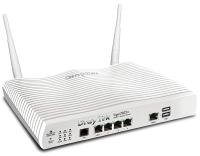
The Netgear DG834G (v5) 802.11g wireless router adds considerable power and flexibility to your network. Five products in one, it combines an ADSL modem, router, 10/100 LAN switch, 802.11g access point, and SPI True Firewall. It gives you untethered continuous connectivity to your network resources and the Internet, and allows you to share your broadband access with all of your networked computers wireless or with wires using Ethernet cables. Featuring high-speed 802.11g wireless capability - up to five times faster than 802.11b - it allows you to download large files, videoconference, and distribute and play high-quality digital movies, photos, and MP3s in the blink of an eye. Simple to use, it plugs directly into your ADSL line. An integrated switch lets you directly connect four computers or any combination of four computers, access points or printers. Setup couldn't be easier - NETGEAR's Smart Wizard install assistant and on-screen help guide you through each step. The Smart Wizard automatically detects and makes the best connection to your ISP. True Firewall protects your network with business-class security against intruders, including logs and alerts of break-in attempts, while VPN pass-through makes it safe to connect to your business network from home or office. The contemporary, sleek design of this unit suits your home or office.The DG834G gives you instant connectivity with or without wires, and works with your existing 802.11b devices as well as your new 54 Mbps 802.11g devices. A built-in ADSL modem furnishes direct, always-on Internet connectivity and multi-user access sharing at speeds up to 140 times faster than dial-up. This powerful router distributes MP3s, digital movies and photos with ultra-fast 10/100 switched LAN ports capable of speeds of 200 Mbps, and shares a single IP address with up to 253 users. And, it boasts double the memory and a 50% faster CPU than many popular routers.
No need for a separate modem - this connects directly into your ADSL line. Built-in Port Forwarding settings, Universal Plug and Play (UPnP) and Virtual Private Network (VPN) pass-through make it simple to play Internet games, send instant messages, and host Internet services. User interface matches your local language (English, French, German or Italian). It supports PCs, Macintosh, and virtually all Ethernet devices, and comes with an Ethernet cable for connecting your first computer.
True Firewall using Stateful Packet Inspection (SPI) and Intrusion Control features Denial of Service protection from hacker attacks, while VPN (Virtual Private Network) pass-through permits secure access to your office or corporate network and enables you to host VPN services. Content filtering lets you control access to inappropriate web sites and limit usage by time of day. Logs browsing activities and provides optional e-mail alerts so you can monitor access. DMZ support allows unrestricted access from the Internet to one computer (for hosting web services).
Replace the old DSL equipment you received from your Internet service provider
- Share your broadband Internet connection simply and securely
- Wirelessly surf the Internet, email and chat
- Freedom to switch DSL providers without changing equipment
- Easy setup
- Wireless-G router with integrated ADSL2+ modem
- Wi-Fi on/off switch to turn off wireless signals
- Push 'N' connect using Wi-Fi Protected Setup (WPS)
- A secured connection at the push of a button
- Convenient on/off switch helps save energy when not in use
- Efficient Energy Star-compliant power supply
- Packaging manufactured with at least 80% recycled materials
Price Breaks
| Qty | 5-9 | 10-19 | 20-49 | 50-99 | 100+ |
|---|---|---|---|---|---|
| ex VAT | £42.31 | £42.09 | £41.87 | £41.65 | £41.42 |
| inc VAT | £49.72 | £49.46 | £49.20 | £48.94 | £48.67 |
Specification
Product Specifications
General | |
|---|---|
| Device Type | Wireless router |
| Form Factor | External |
| Width | 17.5 cm |
| Depth | 11.9 cm |
| Height | 2.8 cm |
| Weight | 300 g |
| Localisation | English / United Kingdom |
Networking | |
| Connectivity Technology | Wireless, wired |
| Integrated Switch | 4-port switch |
| Data Transfer Rate | 54 Mbps |
| Frequency Band | 2.4 GHz |
| Line Coding Format | DBPSK, DQPSK, CCK, 64 QAM, BPSK, QPSK, 16 QAM, OFDM |
| Framing Format | ANSI T1.413 |
| Data Link Protocol | Ethernet, Fast Ethernet, IEEE 802.11b, IEEE 802.11g |
| Spread Spectrum Method | OFDM |
| Switching Protocol | Ethernet |
| Network / Transport Protocol | TCP/IP, PPTP, UDP/IP, L2TP, IPSec, PPPoE, PPPoA |
| Routing Protocol | RIP, static IP routing |
| Remote Management Protocol | HTTP |
| Capacity | IPSec VPN tunnels : 5 |
| Status Indicators | Port status, power |
| Features | Firewall protection, DMZ port, auto-sensing per device, dynamic IP address assignment , DHCP support, NAT support, VPN support, auto-negotiation, auto-uplink (auto MDI/MDI-X), Stateful Packet Inspection (SPI), DoS attack prevention, E-mail alert, VPN passthrough, URL filtering |
| Compliant Standards | IEEE 802.11b, IEEE 802.11g, Wi-Fi CERTIFIED |
Aerial | |
| Directivity | Omni-directional |
Communications | |
| Type | DSL modem |
| Digital Signaling Protocol | ADSL, ADSL2+ |
| Protocols & Specifications | ITU G.992.2 (G.Lite), ITU G.992.1 (G.DMT) Annex A |
| Max Transfer Rate | 24 Mbps |
Expansion / Connectivity | |
| Interfaces | 4 x network - Ethernet 10Base-T/100Base-TX - RJ-45 ¦ 1 x modem - ADSL2+ - RJ-11 ( WAN ) ¦ 1 x network - Radio-Ethernet |
Miscellaneous | |
| Included Accessories | Vertical stand |
| Cables (Details) | 1 x network cable ¦ 1 x phone cable |
| Encryption Algorithm | 128-bit WEP, 64-bit WEP, WPA-PSK |
| Compliant Standards | CE, FCC |
Power | |
| Power Device | Power adapter - external |
Software / System Requirements | |
| OS Required | Microsoft Windows 98 SP2, Microsoft Windows 2000 / ME / XP/ Vista |
Environmental Parameters | |
| Min Operating Temperature | 0 °C |
| Max Operating Temperature | 40 °C |
| Humidity Range Operating | 0 - 90% |
Product Reviews
Ebuyer.com customer reviews give you the chance to give your opinion on the latest technology products. See what customers had to say about this product below. To view more reviews or write your own review, use either of the buttons below.
Excellent
operating system:
Not ApplicableHad one of these now for around a month..
It has been working online since the day I got it, the speeds & range are very good,
There is a firmware upgrade to this product available at the moment, if anyone is getting one
of these I would recommend anyone not to upgrade the firmware because alot of complaint
are being made, and routers are being sent back to netgear because there un-fixable..
Its solely up to you though, I'm holding back on the firmware upgrade because mine works great
4 RJ45 sockets around the back
1 RJ11 for the ADSL internet
You get 1 Microfilter
With this product I also purchased Netgear WG511 54mbps PC Card 128bit Wless (QuickFind code: 46056)
haven't had any problems with it.. was simple and easy to set up, also brought one of these Netgear
10/100Mbps Ethernet Card RJ45 PCI FA311 (QuickFind code: 16435) again no problems
So overall with all my Netgear purchases im very happy easy to use
Well done Netgear
What a Doddle
operating system:
Windows 2000Unit delivered Friday 21/11/03. Installed Monday 24/11/03. So easy to install. Connected first time to routers interface, a few credentials to enter and bang - connected to web at 1.1Mb. Combined with WG511 PCMCIA in a Compaq PII laptop, excellent - well worth the money and the wait.
Read the Instructions
operating system:
Not ApplicableJust re-read these reviews as I was ordering a couple more of these routers for stock. Why or why oh why don't ebuyer filter out the obvious nerds who write the most stupid negative reviews here? I know that open crisiscism is good (indeed I encourage it) but some of the comments here are dreadful and VERY out of date. Save it to say that Netgear have just updated the firmwear on these routers to the very latest high speed adsl standard. All for free and it works. If and it's a big if) your update fails then there is a recovery utility to get you back where you started. It should be obvious that you download the recovery utility BEFORE even thinking of upgrading. It's there if you look. But that is where the problem arises, nobody there to read the instruction TO the reviewers, they have to read for themselves. Too bad that! Buy this and ignore the old reviews! By the way BOTH versions operate exactly the same although you will get the newer version 2 from ebuyer. The power supplies though are NOT, repeat NOT interchangible. One works at 15Volts, 'tother at 12Volts. Don't muddle them up!
Netgear DG834G 54Mbps
operating system:
Windows XPWell up and running for the last 5 mins .How can i give it 5 stars you ask? Easily i say... it has installed straight away , no hassle ,very stable and seems well put together .I have just had 3 days of headaches with a D-Link 300G+ adsl modem .This to be fair worked for a while but everytime i disconnected it refused to work again .This combined unit has stopped the headache like Paracetamol never could .Buy one you will not be dissapointed .
Brilliant! Just get one!
operating system:
Not ApplicableGot this a couple of weeks ago and had it up and running with full 128 bit WEP alongside 2 MA101s in under 30 minutes.
Chapter 3, 4 and 5 of the installation manual give you the full run down on how to install the router in clear and fully understandable instructions.
Make sure you download the latest firmware for the router and the latest installation software for your adaptors from Netgear.
Recipe for setting up a secure Wireless Network.
1.)Test the network without any encryption or device limitation controls.
2.) Set up SSID
3.) Let the wireless adaptors pick up the SSID or enter in yourself
4.) Test network
5.) Set up Encryption on router by entering mode (i.e. 128 bit) enter catchphrase and generate pass key, keep copy of pass key to enter on each of the wireless adaptors via their security configuration utility.
5.) Turn on device limitation control on router and bobs your uncle. You've got a secure Wireless network in no time.
Brilliant!
Got 2 PCs downloading the Call Of Duty demos from the Fragland server in order to test the speed of the network. There was absolutely no percievable difference in speed compared to my old direct PC to ADSL modem set up.
Now I'm going for the Netgear WGE101 Ethernet bridge so that I can link my X-Box up to X-box Live.
Specs.
PC 1: Athlon 1.4ghz running Win98 and Win 2000
Hooked up with USB MA101 adaptor.
PC 2: Pentium III 466 Mhz running Win 2000
Hooked up with USB MA101 adaptor.
Router: DG834G with upgraded firmware downloaded from Netgear.
Could not have been easier!
Excellent Wireless ADSL Router Modem
operating system:
Windows XPWhat can I say - this is simply an excellent product. Very simple to set up - it detected my ISP settings first time and I was connected in minutes. Upgrade firmware to 1.03.00 ( http://www.netgear.com/support/products/DG834G.asp) to get WPA security.
Ordered Monday-Up and running 4.00pm Tuesday!
operating system:
Windows XPOrdered this along with Netgear 54MPS Wireless USB2 Adaptor and Ebuyer 54MPS PCMIA card. Connect up, enter ISP info and away you go!Setup time 10 mins (took longer to plug in than configure!) Instantly recognised the other 2 items-card in my Laptop-adaptor on my daughters PC-would recommend all three products-certainly lives up to other peoples comments
Netgear DG834G 54Mbps update
Just a little tip.This is a great product however it is very important to upgrade the firmware.This improved the wireless signal throughout the house by 100% .I forgot to mention this in my earlier review.Have fun and buy one !
Good product
operating system:
Windows XPAfter hearing from a number of people that they have had problems with wireless Belkin products I decided to keep most of my network Netgear, as I know a few people who have had very good experiences with them.
(the one Belkin device I use on my network is the most problematic)
I use this product with 2 Netgear wireless, 1 Belkin wireless 2 built-in wired Ethernet cards and one E-buyer value Ethernet card, I use E-Buyer value network leads for my wired desktops, and an upgraded Linksys antenna.
Works well on all, with a very reliable signal level and speed. It has never dropped the connection and works well sharing my Tiscali Broadband connection. I have found that it connects reliably and have used it to move large file including music and Video.
It was very easy to set up, so much so that I thought that I did it wrong it was so quick.
I use it on 6 computers and 2 of them run windows 98 and the others are XP SPK2. In the 6 or so months that I have had it there have been no problems on any of them.
The range with the original antenna was decent (certainly comparable with any other product). Though the Wireless range is now better with the upgraded antenna. I only did this as I needed the wireless to work in an outbuilding in my Garden.
I upgraded to the newer firmware, (downloading the recover tool as well, and make sure that you perform this task with a computer connected via wired not wireless) not as the signal was bad, but I wanted to make sure that I got the most out of my product, but I have noticed no change, no harm caused though.
This product also looks very good, is small and the v2 (version 2) that I use runs very cool. (I heard that the v1 can run hot, not a problem as I think that E-Buyer stocks the v2) I decided not to use mine on the vertical stands as it looked a little unstable, though the unit is small anyway, so not a problem.
I use mine on WEP encryption and it works well and it was easy to set up.
Overall I am glad that I decided to pay the little extra and buy mainly Netgear Wireless products including this router. It works well and has caused no problems. I don’t feel that it is worth spending more money on more expensive wired products though as the leads and Ethernet cards that I had to buy were E-Buyer value and they work great with this router.
Super Product
operating system:
Not ApplicableA really easy product to connect and get working and is proving really reliable. Mine has now been connected to the net for 120:30:59 (since I bought it!).
I am running a Windows 2000 Server Domain I have the workstation gateways set as the router and the DNS set as the server. Any DNS queries the server can't reply to sends direct onto the router and then onto ISP etc.
My laptop and the other 2 stand alone machines have the gateway and DNS pointing direct to router.
Super stuff
A great buy...
Product Discussion
Join in with the Ebuyer product discussions today to ask questions, exchange stories and share opinions with other Ebuyer customers who have bought this product.


356 reviews